Contact us
Share a few details and we’ll be in touch shortly to either answer your questions.


How HR Consultants Can Automate HR Audits for Clients (2026)

Introduction
HR consultants are often drawn to consulting for the same reason: they enjoy solving real business problems. They know how to identify risk, improve processes, and guide leaders through complex people decisions. What many consultants do not anticipate is how much time and energy is required to run the business around that work.
As consultants take on more prospects and clients, three challenges tend to emerge quickly. First, it becomes harder to qualify inbound and outbound leads efficiently. Second, early sales conversations often fail to convert into paid work, not because of lack of value, but because there is no clear structure for follow-up. Third, once clients are signed, it can be difficult to justify higher rates, expanded scope, or recurring retainers without falling back on vague promises.
One tool consistently helps address all three challenges when designed intentionally: a high-quality HR audit.
This guide walks through how HR consultants can design and automate an HR audit that supports marketing, sales, and long-term client management, using accessible, low-code tools. The goal is not to replace your professional judgment, but to systematize your HR audit process in a way that scales and protects your time.
How HR Consultants Use HR Audit Tools to Scale
For HR consultants, an HR audit provides clients (and potential clients) with a structured diagnostic. When delivered early, the HR audit can start sales conversations. As prospects move closer to a decision, it can surface whether there is a real fit and enough urgency to act. Once a client relationship is established, it can provide a shared framework for tracking progress, reprioritizing work, and discussing what comes next.
When viewed this way, the HR audit is less about compliance and more about creating structure for a client relationship. It gives consultants a consistent way to assess risk, communicate priorities, and anchor recommendations in documented findings rather than opinion or intuition.
HR Audits as a Top-of-Funnel Marketing Resource
Top of funnel refers to the earliest stage of the client journey, when a prospective client is becoming aware of a problem and exploring possible solutions. Most consultants rely on blog posts, checklists, or webinars at this stage. While helpful, these resources are generic by nature.
An HR audit offers something different. It provides a personalized snapshot of a business’s current state. Even a lightweight audit creates immediate relevance because the output is based on the prospect’s own inputs.
In prior HR tech work supporting consultants selling HR services to small businesses, personalized assessments consistently outperformed static resources in engagement and follow-through. Prospects are more likely to continue a conversation when they can see their own gaps reflected back to them in plain language.
HR Audits as a Lead Qualification Tool
Not every prospect is a good fit for consulting services. Some businesses are not ready to invest. Others do not experience enough pain to prioritize action. Relying solely on instinct during sales calls makes it easy to over-invest time in low-probability opportunities.
An HR audit provides objective signals early in the process. Responses can highlight whether a business is exposed to meaningful risk, whether its challenges align with the consultant’s expertise, and whether leadership appears proactive or reactive.
This allows consultants to prioritize follow-up where there is genuine opportunity, while still delivering value to every participant.
HR Audits as a Client Relationship Management Tool
Once a prospect becomes a client, the audit should not disappear. Instead, it becomes a shared reference point. Audit results can be revisited over time to track improvement, reassess priorities, and identify new areas of opportunity. This makes it easier to anchor conversations about scope expansion, pricing changes, or retainers in documented needs rather than subjective judgment.
Consider how this might land with a client:
“In the last 60 days, we’ve closed 8 out of 10 of your most pressing compliance gaps. Let’s keep this progress going by addressing some of the gaps I found in your company culture and employee development processes. Left unchecked, these are some of the issues you will predictably face…”
Clients tend to respond more positively to recommendations that are tied to previously identified gaps and measurable progress. This is where you justify continued services and rate increases.
The Benefits of Automating Your HR Audit
Early in your consulting journey, it’s common to manually customize everything. This approach feels thoughtful, but it will never scale, especially as a solo-prenuer.
Top-of-funnel and sales activities are inherently time-consuming, and many leads will never convert. Automation allows HR consultants to expand reach without expanding effort, ensuring that time is spent where it has the highest impact.
Automation does not remove the consultant from the process. Instead, it handles the repetitive steps, data collection, scoring, summarization, and follow-up, so that the consultant can focus on interpretation and advice.
What You Will Build
The system outlined in this guide results in a self-running HR audit that:
- Collects responses through a form tool such as Typeform
- Assigns numeric scores, either as an overall score or by category
- Stores responses and scores in Google Sheets
- Generates a personalized summary using ChatGPT
- Automatically emails results to the prospect
- Encourages scheduling a consultation
All components can be implemented using low-code tools designed for non-technical users. You don’t need to be an engineer to make this happen, and you don’t need to break the budget.
This automated HR program can be set up for less than $100 per month.
Step 1: Planning the Audit
Before building anything, it’s essential to define the goal for your audit.
Is your audit meant to qualify cold leads? Support outreach? Convert warm prospects or expand existing client relationships? Your answer determines the length, depth, and question design.
Lead Qualification = 10-15 questions
Audits used earlier in the marketing funnel should always be shorter. Asking a cold lead to complete a 50-question audit will feel like homework, and you haven’t earned their time yet. If you’re using an HR Audit to reach out to prospects, keep it short, specific, and avoid high-risk questions.
Lead Follow-Up HR Audits = 15-25 questions
If you’re planning to share your HR Audit with a warm lead (after your first meeting), you can ask a few extra questions and dig deeper than with a cold prospect. Since the lead hasn’t converted into a paying client yet, they may not be willing to commit too much time so stay on the shorter side.
New Client HR Audits = 25+ questions
After you’ve secured a signed contract, your HR Audit can increase in length and ask more sensitive questions (i.e. questions about employee claims or prior employee litigation). The length of your new client HR audit should match their level of investment. For example, you may want to consider a lighter audit for hourly/fixed fee project clients and a more robust HR audit for clients who have committed to a monthly retainer.
Regardless of how you plan to implement the HR audit, these questions should focus on identifying problems you are well-positioned to solve, rather than capturing every possible HR detail. The shorter the audit, the more likely someone will complete it. Remember, if they aren’t finishing the audit, you won’t be able to get any value from the results.
Pro-Tip: Avoid over-engineering your first HR audit. This resource will evolve over time so plan to start small and optimize as you validate the demand and iterate on the questions you include.
Step 2: Building the Audit in Typeform
Typeform is well-suited for this use case because it presents questions one at a time, which improves completion rates and reduces perceived effort. You want responses that are easy to score and easy to analyze later.
The Core Setup
Start by creating a new form in Typeform.
Add a welcome screen that clearly sets expectations. For example:
“Get Your Free HR Health Report in 5 Minutes.”
This screen should answer three questions for the user:
- What this is
- How long it will take
- What they will get at the end
Next, collect basic contact information early in the form. At minimum, include:
- Name
- Business name
- Email address
Capturing contact details up front ensures you can still follow up if someone abandons the audit halfway through.
After contact questions, group your audit questions into logical sections. Common sections include:
- Compliance fundamentals
- Policies and documentation
- Hiring and onboarding
- People operations
Use multiple-choice questions whenever possible. Multiple-choice responses are significantly easier to score, automate, and summarize than free-text answers. You can still allow nuance later in the consultation.
Pro tip: Enable the progress bar. This reassures users that the audit is finite and reduces drop-off, especially for audits that take more than five minutes.
Thank-You Screen
The final screen should explain what happens next.
Let participants know when to expect their results and what the next optional step is. For example:
“Your HR Health Report will arrive in your inbox within a few minutes. If you’d like a free 30-minute walkthrough of your results, you can book time here.”
Including your scheduling link at this stage reduces friction and captures interest while the audit is still top of mind. Do not miss this step!
No scheduling link? No problem. Get started with Shrlock to createe and sharing custom booking links you can include in your automated HR audit system.
At this point, the form is complete, but nothing happens automatically yet. Typeform collects data but does not organize or score it. That is where spreadsheets and automation come in.
Step 3: Creating the Scoresheet (Google Sheets or Excel)
Once your Typeform is built, the next step is ensuring responses are stored in a format you can score, analyze, and automate against. Google Sheets serves as the central data store for your audit responses. Think of it as the system of record that everything else, scoring, summaries, emails, pulls from.
Editor's Note: You can use Excel instead if you prefer, but Google Sheets tends to work more smoothly with automation tools.
Connecting Typeform to Google Sheets (Native Integration)
Typeform offers a native integration with Google Sheets, which means you can automatically send every form submission to a spreadsheet without using a third-party automation tool.
To enable this:
- Open your form in Typeform
- Go to the Connect tab
- Select Google Sheets
- Choose or create a spreadsheet
From that point forward, every completed audit will automatically appear as a new row in your Google Sheet. This native integration handles data capture cleanly and reliably, and it is the simplest way to create your audit data foundation. Funnel Typeform responses into Google Sheets using Zapier (another ingredient covered later).
Designing the Scoresheet
Google Sheets now becomes the central system of record for your audit.
You can use Excel if you prefer, but Google Sheets integrates more smoothly with automation tools later in the workflow.
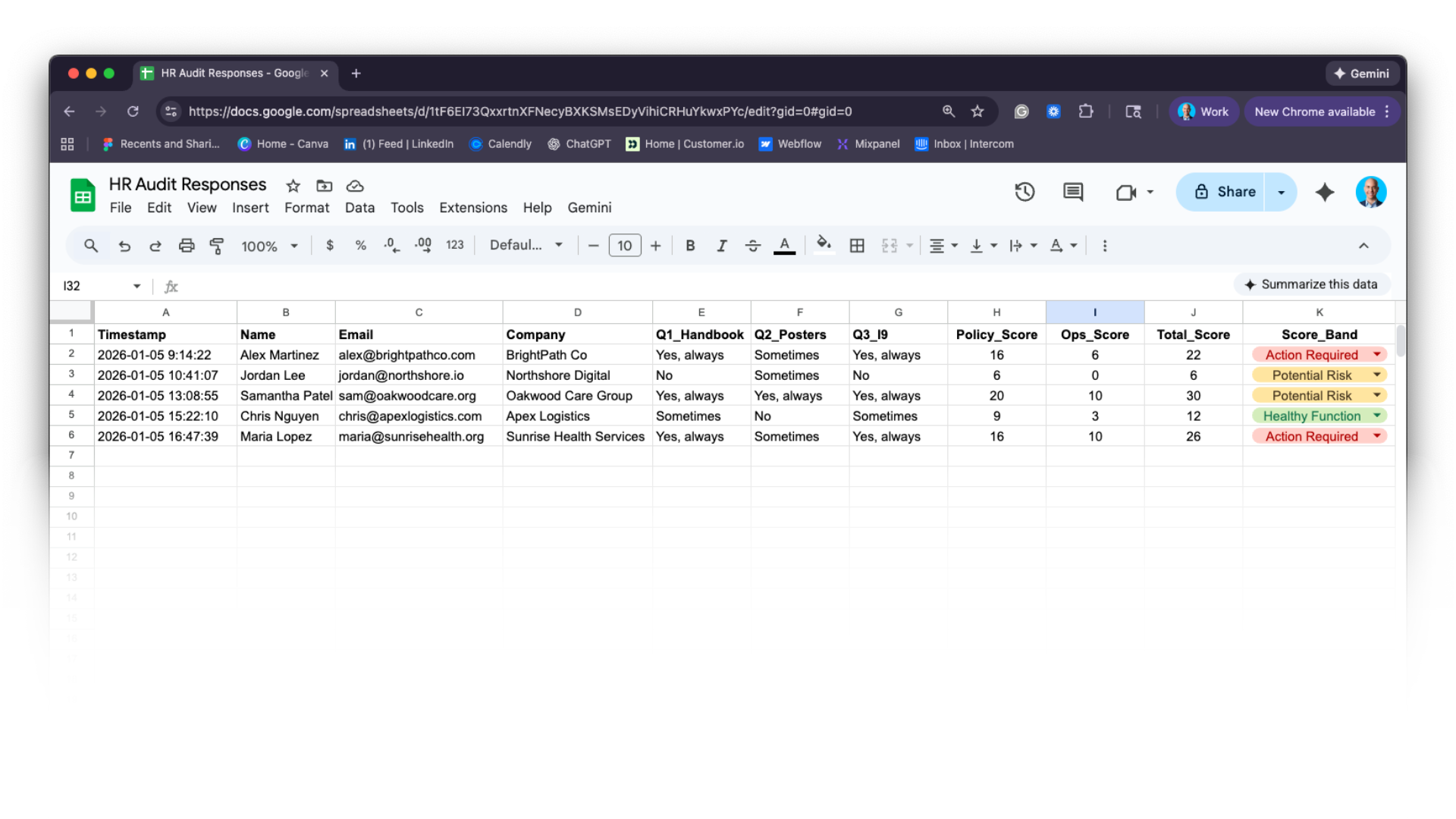
Tab A: Submissions
The first tab should be labeled something like “Submissions.” This tab will receive one new row for every completed audit.
At a minimum, include the following columns:
- Timestamp
- Name
- Company
Typeform will automatically create one column per question using the question text. You may want to rename column headers later to make formulas easier to manage.
After the raw responses, add additional columns manually:
- One column per section score (for example, Compliance_Score)
- A Total_Score column
- A Score_Band column (such as “Potential Risk,” “Needs Improvement,” or “Strong Foundation”)
Score bands help non-HR audiences interpret results without needing to understand what a specific number means.
Tab B: Answer Map (The backbone of your audit process)
The Answer Map is where your HR audit stops being a form and becomes a system. Its job is simple but critical: translate human responses into numerical data so you can calculate scores and automatically assign score bands/risk values.
Without this step, there is no reliable way to:
- Generate section scores
- Calculate a total audit score
- Determine whether a business is “At Risk” or “Healthy.”
In other words, the Answer Map is what turns qualitative input into quantitative insight. Later in this article, we’ll cover how to use AI to generate summaries of HR Audit responses. Creating a strong Answer Mapping system will improve the quality of AI-generated results. Here’s why:
AI tools work best when they are given:
- Structured inputs
- Clear signals about priority and severity
- Simple labels that reduce ambiguity
Raw text answers like “Sometimes” or “No” provide limited context on their own. Numeric scores and score bands add meaning. They tell the system which areas matter most and how urgent the situation is.
With the answer map, you’ll be able to control how you calculate scores, determine level of risk, and convert this information into a value such as “Action Required”. It’s better for you (the expert) to own this calculation than relying on AI to interpret results without your direction.
When these signals are included in the data sent to an AI model, the resulting summaries are more focused, more accurate, and more useful. Instead of producing generic observations, the AI can prioritize issues, explain trade-offs, and recommend next steps that align with the overall health of the business.
Here’s how to create your Answer Map:
Create a second tab in your spreadsheet labeled “Answer Map.”
This tab translates text-based answers into numeric values. For example:
- “Yes, always” = 5
- “Sometimes” = 3
- “No” = 0
Each answer option appears in one column, with the corresponding point value in the next.
You can then use spreadsheet formulas such as VLOOKUP to convert responses in the Submissions tab into numbers automatically.
If VLOOKUP is unfamiliar, it is a formula that looks up a value in one table (the answer text) and returns a related value from another table (the point score). This allows scoring to happen consistently without manual work.
Once your Google Sheet is receiving data and scoring is in place, you can layer on automation to generate summaries and send emails. That is where tools like Zapier or Make come into play in the next step.
Step 4: Scoring and Data Capture with Zapier
At this point, your system has two critical pieces in place:
- A Typeform that collects structured HR audit responses
- A Google Sheet that stores those responses and calculates scores
Zapier is the layer that turns those static pieces into a working system. Its role is not to replace Google Sheets or do the scoring itself, but to move data between tools at the right moments so everything stays in sync.
What Zapier Does in This Workflow
Zapier is an automation platform that connects different tools together using workflows called Zaps. Each Zap has:
- A trigger, which is the event that starts the workflow
- One or more actions, which are the steps that follow
In the context of your HR audit, Zapier can be used to:
- Detect a new row in your Google Sheet (by Typeform)
- Pass that data to other tools at the right time
Think of Google Sheets as the brain of the system and Zapier as the nervous system that sends signals when something meaningful changes.
The Trigger: A New Row in Google Sheets
The core trigger for your first Zap is:
“New Spreadsheet Row” in Google Sheets
This trigger fires whenever a new audit submission lands in your Submissions tab.
Because scoring formulas and the Answer Map live inside the sheet, this ensures Zapier is working with processed, meaningful data, not raw form responses.
Why This Order Matters
This sequencing is intentional.
If Zapier triggered directly from the form submission, it would only see raw text answers. By triggering from Google Sheets instead, Zapier can access:
- Section scores (if applicable)
- Total HR Audit score
- Score bands/Risk Values
This makes downstream automation more accurate and much easier to manage.
Passing the Right Data Forward
Once Zapier detects a new row, it can pull:
- Contact details
- Individual question responses (if needed)
- Section scores
- Total score
- Score band
These fields become inputs for the next steps in the workflow, such as:
- Generating an AI-based audit summary
- Sending a personalized results email
- Logging the response in a CRM or task system
At this stage, Zapier is acting as a messenger, not a decision-maker.
Testing the Trigger
Before building additional steps, test this Zap with a real or sample audit submission.
Confirm that:
- Zapier detects the new row
- All expected fields are available
- Scores and score bands are populated
This test validates that your formulas, Answer Map, and data flow are working together as designed.
Avoid This Common Issue: Formula Timing
One subtle issue to watch for is timing.
Because scores are calculated using formulas, they may take a moment to populate after the row is created. In some cases, Zapier can trigger before calculated fields are fully filled.
If this happens, add a short delay step in Zapier or configure the trigger to look for a specific field (such as Total_Score) being present. This ensures Zapier only proceeds once scoring is complete.
Step 5: Generating a Personalized Summary with ChatGPT
At this stage, your system has already done the most important work.
You have:
- A completed HR audit
- Structured responses stored in Google Sheets
- Formula-driven section scores and a total score
- A plain-language score band that reflects overall risk
This structure is what makes AI useful here.
ChatGPT is not being asked to interpret raw answers or guess what matters. Instead, it is being given clear signals about priority, severity, and context, and asked to turn those signals into a readable summary.
Zapier is the tool that connects these pieces.
What ChatGPT Is Doing (and What It Is Not)
ChatGPT’s role in this workflow is narrow and intentional.
It is responsible for:
- Turning structured data into a plain-English summary
- Explaining what the scores mean in context
- Highlighting priorities and quick wins
It is not:
- Deciding how scores are calculated
- Determining risk levels
- Replacing your professional judgment
Those decisions are owned by you and encoded earlier in the Answer Map and scoring logic. This is an important distinction, and one worth reinforcing for readers who may be wary of AI.
Where Zapier Fits In
Zapier acts as the bridge between your spreadsheet and ChatGPT.
Once Zapier detects a new, fully scored row in Google Sheets (from Step 4), it can pass selected fields into ChatGPT and request a written summary.
At a high level, the flow looks like this:
- Trigger: New scored row detected in Google Sheets
- Action: Send selected data fields to ChatGPT with instructions
- Output: AI-generated audit summary is returned as a new column in Google Sheets
Once the summary lives in the sheet, it can be safely reused for:
- Email delivery
- CRM notes
- Sales call preparation
- Historical tracking over time
Choosing What Data to Send to ChatGPT
You do not need to send everything.
In fact, sending less data often produces better results.
At minimum, consider passing:
- Company name
- Section scores (for example, Compliance_Score, Ops_Score)
- Total_Score
- Score_Band or Risk_Value
You may also include a small subset of key answers if they add useful context, but avoid overwhelming the model with raw survey data.
The goal is to give ChatGPT enough structure to understand:
- Where the business is strong
- Where risk is concentrated
- How urgent the situation is overall
Writing the Prompt (Plain English Instructions)
In Zapier, you will configure an action that sends a prompt to ChatGPT. The prompt is simply a set of instructions telling the model how to use the data you provide.
A good prompt does three things:
- Establishes context
- Explains the scoring system
- Defines the tone and output format
Conceptually, your prompt should say something like:
“You are summarizing an HR audit for a small business owner. The audit includes section scores, a total score, and a score band that reflects overall HR risk. Use this information to explain what is working, where attention is needed, and suggest a few practical next steps. Avoid jargon. Write clearly and professionally.”
You are not asking ChatGPT to invent insights. You are asking it to explain the implications of the scores you already control.
Why Structured Scores Matter Here
This is where the work you did in earlier steps pays off. Your Answer Map will deliver higher-quality, more predictable AI-generated summaries.
- ChatGPT can prioritize issues instead of listing everything
- The summary reflects urgency without sounding alarmist
- Recommendations align with the overall health of the business
For example, a low Compliance_Score paired with an “Action Required” band naturally leads the summary to focus on risk mitigation first. A higher score band allows the tone to shift toward optimization and improvement.
Without this structure, AI summaries tend to be generic, and you want to ensure the value your provide is relevant and specific to the potential client.
Testing and Refining the Output
As with previous steps, testing matters. Run a few sample audits through the workflow and review the summaries:
- Do they reflect the score band accurately?
- Are the priorities reasonable?
- Is the language appropriate for a non-HR audience?
You can refine the prompt incrementally to adjust tone, length, or focus. Small changes often produce meaningful improvements. This is not a one-time setup. Treat it as a living component of your system.
Why This Step Improves the Client Experience
From the client’s perspective, this step is where the audit starts to feel polished.
Instead of receiving a spreadsheet or raw scores, they receive:
- A clear explanation of what their results mean
- Context for why certain areas matter
- A sense of direction before ever getting on a call
This positions you as thoughtful and prepared, and sets an important precedent: you deliver value fast. These are precisely the kind of qualities a client is looking for.
In the next step, we’ll use Zapier again to automatically deliver this summary via email and guide the prospect toward a follow-up conversation.
Step 6: Emailing Results Automatically
At this point in the workflow, all of the hard work is done.
You have:
- A completed HR audit
- Formula-driven scores and a clear score band
- An AI-generated summary written back to Google Sheets
What remains is delivery.
This step is about getting the right information to the prospect quickly, clearly, and in a way that naturally leads to the next conversation.
Why Speed Matters Here
Timing has an outsized impact on engagement.
When someone completes an HR audit, their interest is highest in the minutes immediately afterward. Delaying results by hours or days increases the likelihood that:
- The context is lost
- The urgency fades
- The follow-up feels disconnected
Automating delivery ensures that every prospect receives value while their attention is still focused on the problem the audit surfaced.
Zapier’s Role in Email Delivery
Zapier is used here to detect when an audit is fully complete and ready to be sent.
The trigger for this Zap is typically:
- A new or updated row in Google Sheets
- Where the AI Summary column is no longer empty
This ensures the email is only sent once scoring and summarization are finished.
What the Email Should Include
The goal of the email is not to overwhelm the reader. It should orient them, explain what they’re seeing, and offer a clear next step.
A strong results email includes three elements:
- The headline result
This might be the total score or score band. For example:
“Your HR Health Score: 22/30 (Needs Improvement)” - The written summary
This is the AI-generated explanation that interprets the results in plain language. Because this summary is already stored in Google Sheets, Zapier simply pulls it into the email body. - A clear call to action
The email should invite the recipient to schedule time to review the findings together. Including your scheduling link directly in the email reduces friction and increases conversion.
Importantly, this email should feel informative, not promotional.
Choosing the Sending Tool
Zapier can send emails through tools such as Gmail or Outlook. Using your actual inbox (rather than a generic system sender) helps the message feel personal and increases deliverability. If you have a dedicated client email platform such as Mailchimp or Customer.io, use Zapier to send your emails there.
From the reader’s perspective, it should feel like a thoughtful follow-up, not an automated blast.
Keeping Google Sheets as the Source of Truth
Because the summary lives in Google Sheets, the email step becomes simple and reliable.
Zapier is not regenerating content or recalculating anything. It is simply:
- Reading the completed row
- Pulling the score, score band, and summary
- Sending them to the prospect
This makes the system easier to debug, adjust, and scale.
Optional: Adding a Follow-Up Reminder
Not every prospect will book a call immediately, even if the audit reveals meaningful gaps. A light follow-up can help re-engage without feeling pushy. You can create additional Zaps to trigger follow-up emails, typically after 2 days, 5 days, and 14 days.
Your follow-up should be brief and focused, highlighting one or two actionable insights from the audit and offering to walk through them live. The tone here matters. The message should feel helpful and low-pressure, reinforcing that the audit is a starting point, not a sales pitch.
Why This Step Completes the System
With automated delivery in place, your HR audit becomes a complete experience.
Every prospect receives:
- Timely results
- A clear explanation of what those results mean
- A natural path to the next conversation
From your side, the system runs consistently without manual effort, ensuring no lead falls through the cracks and no follow-up relies on memory.
In the final section of this guide, we’ll look at how to use this audit system across marketing, sales, and ongoing client relationships to support sustainable growth.
Conclusion
Automating your HR audit process gives you something most consultants are always chasing more of: time and clarity. When you systematize data collection, scoring, summarization, and delivery, you remove repetitive work from your day and free up more of your attention for interpretation, strategy, and client relationships. A well-designed automated audit not only strengthens your marketing and sales efforts but also sets clear expectations and leaves prospects and clients with a valuable, personalized snapshot of their current HR health.
As the HR landscape becomes more complex in 2026, clients will increasingly expect consultants to bring both expert insight and operational efficiency to the table. By building a repeatable, automated HR audit workflow, you are positioning yourself to scale your business, justify higher rates, and deepen long-term client engagement.